← All tools / Local model
Qwen 3.8 27B on a Mac (Ollama)
The same free model we run on our PC, on a MacBook Pro M4 Pro. The answers are just as good; it just writes about a quarter as fast.
Tested 2026-11-09
This is the exact same model file as our PC review of Qwen 3.8 27B, running through Ollama on a MacBook Pro with an M4 Pro chip and 24 GB of memory. Same settings too, with 24K of reading room and thinking turned off.
On a Mac the graphics chip shares the computer's memory instead of having its own, so a 14 GB model fits without a separate graphics card. macOS lets the graphics side use about 19 GB of the 24, which is enough for this model and a 40-page document, with not much to spare.
It got the same questions right as the PC, run for run, but everything took about four times as long.
Get it
Free. Needs an Apple Silicon Mac, and 24 GB of memory is the least we'd try this model on.
Set it up
- Install Ollama with Homebrew:
brew install ollama- Start it with our memory settings:
OLLAMA_FLASH_ATTENTION=1 OLLAMA_KV_CACHE_TYPE=q4_0 ollama serve- In a new terminal window, download the model (about 14 GB):
ollama pull hf.co/unsloth/Qwen3.8-27B-GGUF:UD-Q3_K_XL- Make the same 24K tag we use on the PC. Save these two lines as
Modelfile-24k:
FROM hf.co/unsloth/Qwen3.8-27B-GGUF:UD-Q3_K_XL
PARAMETER num_ctx 24576
ollama create qwen38-24k -f Modelfile-24k
ollama run qwen38-24k --think=falseRunning it
It writes about 12 tokens a second, so you watch the words come in. A hard question took about four minutes and the 40-page document took a bit over three.
The answers were exactly as good as on our PC, run for run, and it read all 12 test screenshots. We give it jobs we can walk away from.
Watch out for
Snags we hit, and how to get past them.
The Mac can't use all 24 GB for the model
macOS lets the graphics side use about 19 GB of the 24. The model takes 13 to 15 GB of that, so quit browsers and anything else heavy before a long document.
Closing the terminal stops Ollama
ollama serve only runs while that window is open. Leave it open in the background while you work.
Answers take ages and start with a wall of "thinking"
Thinking is on by default for this model. Run it with --think=false, like in step 4.
The Benchmark Receipts
5 of 5 tests run-
Long document questions
On questions about 30 invented facts hidden in a 15,453-word document (about 40 pages), 192 s per run. The facts include look-alikes, figures corrected later, answers that need two passages combined, and one question the document never answers, all new every run. Misses were on: two-step.
52/603 runs -
Coding task
The job: add blockquotes to this site's own markdown renderer (a 90-line Python function) without changing anything else. Each answer is run against 12 checks: 7 quote cases and 5 inputs that must render exactly as before. About 83 s per answer. The same model on our PC also passed every run, in about 24 s.
36/363 runs -
Hard reasoning
On fresh multi-step problems (seven-seat logic puzzles, renewal dates with a weekend rule, tiered pricing with discount, coupon and tax, filling rates with a delayed drain, counting with four conditions), 232 s per answer on average.
26/303 runs -
Image understanding
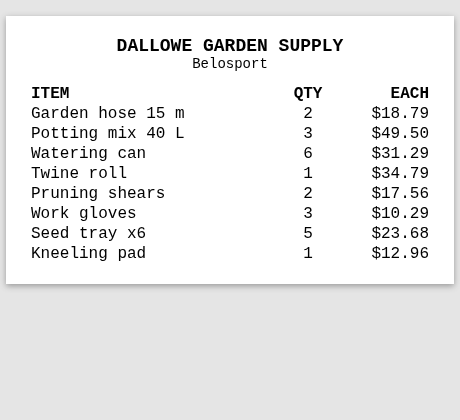
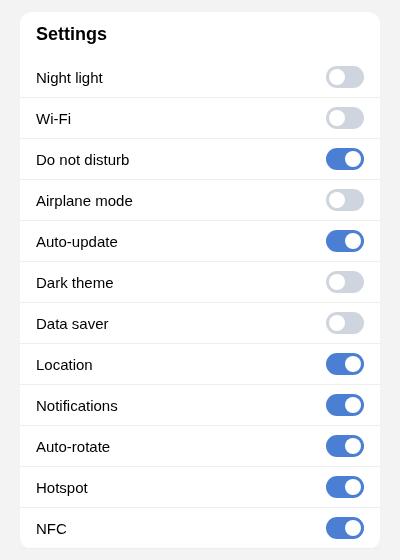
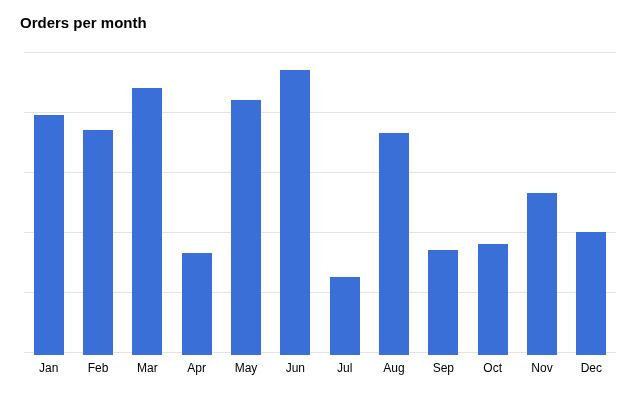
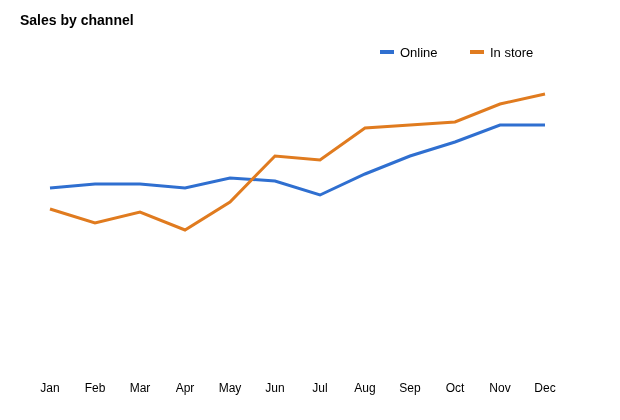
Screenshots read correctly: the biggest line total on a receipt (quantity times price, not printed), which of 12 unlabelled phone toggles are on, three bars ranked on an unlabelled chart, and where two lines cross.
12/123 runs -
Cost for a standard week
$0 per token. A standard week of 200 prompts means about 12.9 hours of waiting at this model's speed on a MacBook Pro M4 Pro with 24 GB (232 s per answer, about 2,826 tokens each).
Freeabout 12.9 h of waiting a week
How fast is it?
Free · every Thursday
Get the next test in your inbox
Every Thursday: the tools we tested, the receipts, and what each one costs to run. One email, unsubscribe in one click.
What it was shown
The four screenshots from the latest image test, and what this model answered. Every model in this test saw these same four.
Strengths
- Same answers as the PC version: the Mac doesn't make the model dumber
- Read all 12 screenshots correctly across three runs
- Runs on a laptop with no graphics card, no account and no per-token cost
- Ollama installs with one command (
brew install ollama)
Weaknesses
- Writes about a quarter as fast as our RTX 4080 SUPER: around 4 minutes per reasoning answer
- A standard week of 200 prompts means about 13 hours of waiting
- 24 GB is the floor for a 27B model: close everything else while it runs
Our take
It works, and the Mac doesn't make the model any dumber. It's just about four times slower than our gaming PC. If a Mac is what you have, use it for jobs you can walk away from and send anything you're sitting there waiting on to a cheap cloud model.
Same answers as our gaming PC, but it writes about a quarter as fast, so a normal week means around 13 hours of waiting.
Your turn
Have you tried Qwen 3.8 27B on a Mac (Ollama)? Tell us how it went, give it your own score, or tell us what we missed. We read every one before it goes up.
Thanks! We read everything before it goes up, so it’ll appear here once we’ve had a look.
We need a valid email (never shown) and either a few words or a star rating.
That’s a lot of comments in a row. Give it an hour and try again.
Something broke on our end. Please try again in a few minutes.
Links & Docs
About this test
We test every AI tool ourselves, whether it's a cloud model, a local model or an app that runs them. Every review gets the same five tests on our own machine or account, and it shows which ones we haven't run yet (the score stays provisional until all five are done). Ads and affiliate links help pay for the testing, but they never move a score. Read how we test models →
One email a week
What we tested this week, what it cost to run, and the one tool worth your time. No spam, unsubscribe in one click.